The extruder assembly is a critical component of your Creality K2 Plus 3D printer, responsible for melting and extruding filament. If it's damaged or worn out, replacing it is a relatively simple process that can help prevent prints finishes. This guide provides a step-by-step walkthrough of the replacement process, including detailed instructions and troubleshooting guide for TR2582, TC2841, TC2854, TE2761, to help you successfully replace your extruder assembly and get back to printing OEMs parts.
TABLE OF CONTENTS
- General Notes/Tips:
- Install Video:
- Spare Parts:
- How to Replace Spring on Extruder Arm:
- Community Mods:
- Written Guide:
- Common Error
General Notes/Tips:
Ensure you press down on the PTFE Connector when removing the PTFE Tube, otherwise you may damaged the teeth if you pull without pressing down to release the teeth on the PTFE
Its recommenced to print the Community Mods to improve strain relief the PTFE and also help with more brittle materials not breaking at entry of the extruder.
Install Video:
Community Video:
Spare Parts:
Extruder Spare Parts:
Extruder Housing Only (PTFE Coupler)
Filament Sensor Only
Complete Assembly Extruder Replacement Part

How To Replace PTFE Connector
Using Flat Head as shown, similar to DXC 2, you can remove connector and install new press fit connector. These are press fit into place, some force is required to install new connector.
Spare Parts: https://store.dremc.com.au/products/creality-press-fit-ptfe-tube-fitting
How to Replace Spring on Extruder Arm:
Assembly:
RED Arrow - use left thumb to compress spring and partially engage with slot.
GREEN Arrow - use left index finger to compress spring fully.
BLUE Arrow - use right thumb to press the lever down into the casing
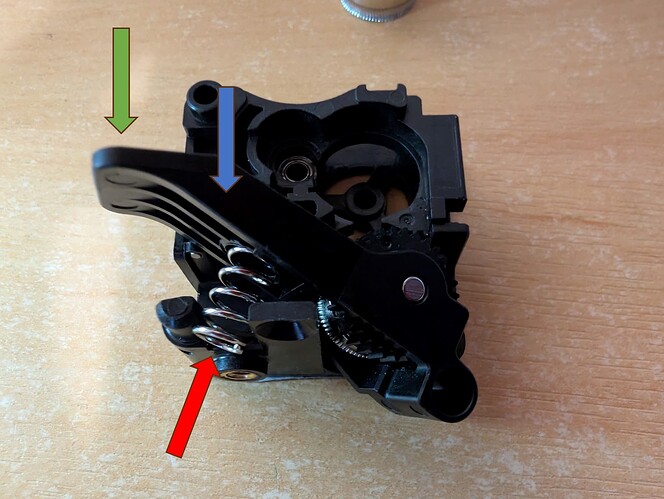
Cedit: https://forum.creality.com/t/the-k2-extruder-arm-spring-fears-my-name/34293
Community Mods:
(Recommended if you existing is still working or recently replaced) Improve Strain Relief: https://www.printables.com/model/1208583-creality-k2-plus-add-on-to-prevent-extruder-bowden
Improvement :
https://www.printables.com/model/1253678-improved-k2-extruder-ptfe-tube-clip
Just a failed Clip? You can print below printed part to secure the PTFE in case your PTFE Connector on extruder spring as failed.
Guide: https://wiki.creality.com/en/k2-flagship-series/k2-plus/secure-PTFE-tube
STL Download: https://www.crealitycloud.com/model-detail/67d0f5a501a789ce78188112?source=5
Improve repair-ability and cost of the PTFE Connector, as you would just need replace PTFE instead of more costly sub assembly:
Alternative PTFE Connector Type:
- https://www.crealitycloud.com/model-detail/6774cf7006c912fef1b5e5c8
- https://www.printables.com/model/1167959-bowden-tube-retainer-for-k2-plus-extruder
Written Guide:
Source: https://wiki.creality.com/en/k2-flagship-series/k2-plus/extrusion-assembly
1. Tool Required:

Extruder x1
L-wrench x1
2. Install Guide:
2.1 Remove the top cover
For ease of operation, you can first remove the glass cover of the printer.

2.2 Remove the hotend cover
Remove the hotend cover of the printer with a hand oblique upward. (Note: the cover is magnetic without screws.)


2.3 Remove the three screws on the right side of the extruder
Move the hotend to the far left of the X axis and use an L-wrench to unscrew the three fixing screws to the left.

2.4 Remove a fixing screw on the left side of the extruder
Move the hotend to the far right of the X axis and unscrew a fixing screw to the right with an L-wrench.

2.5 Unplug the extrusion assembly control wire & Teflon tube
Press the plug on the pneumatic connector and pull out the Teflon tube.


Gently pull out the control wire of the extrusion assembly, taking care not to break the terminal.

2.6 Unplug the control wire of the extrusion motor
Gently pull out the extrusion assembly, pay attention to the strength, do not tear the connection wire.

Pull out the two wires behind the extruder motor plate.


2.7 Connect the control wire of the new extrusion motor
Connect the two rows of wires behind the extrusion motor plate. The thickest cable is on the top, and the bottom left cable is beneath. Note: the connection wire of the extrusion assembly (marked with circles in the figure).


Push the extrusion assembly into the mounting position, and take out the extrusion assembly cable inside.

2.8 Connect the terminals of the new extrusion assembly
Connect the cable to the interface terminal above the motor assembly.

2.9 Install the new extrusion assembly fixing screws
Install the two screws on the right of the extruder.

Install one fixing screw on the left side of the extruder.

2.10 Install PTFE pipe
Hold down the plug of the pneumatic interface and insert the Teflon tube.


2.11 Install the hotend cover

Common Error
TR2852 | Tool Kit | Filament detector triggered abnormally, possibly due to an external material rack being used with CFS. | During the use of CFS, if the extruder's material break detector is triggered abnormally after the filament is unloaded, it may be due to the filament being inserted into the external material rack during use or the filament breaking in the extruder when the filament is unloaded. |
TC2841 | Tool Kit | Cutter issue, cutter might be jammed, please try again after resolving | During the cutting process, it is detected that the cutter may be stuck or there may be no cutter. |
TC2854 | Tool Kit | Filament detected in the extruder, affecting the cutter calibration. Please unload the filament and try again. | 1. During the vibration optimisation operation, it was found that there are filaments in the extruder. When you start the function, it is necessary to ensure that there are no filament in the extruder. 2. You can manually click to Retract (Unload filament). If the filament fails to be retracted when cutting continuous filaments, you can unlock the motor, hold the extruder against the cutter push rod, and then click to retract. |
TE2761 | Tool Kit | The nozzle leveling sensor may have a hardware failure. | The extruder leveling sensor may have a hardware failure and needs to be replaced |
Was this article helpful?
That’s Great!
Thank you for your feedback
Sorry! We couldn't be helpful
Thank you for your feedback
Feedback sent
We appreciate your effort and will try to fix the article