Is your Anycubic Kobra S1 experiencing inconsistent extrusion, grinding noises, or filament feeding issues? Replacing the entire extruder assembly can resolve these problems and restore reliable performance. This guide walks you through the complete process, from safely removing the print head and disconnecting the wiring harness to installing the new extruder module and reconnecting all components . Using basic tools (S2.0 and S2.5 Allen keys), you'll learn how to transfer the strain gauge assembly and, properly route cables, and ensure everything is securely fastened before your next print . Always power off and unplug your printer before starting any maintenance.
TABLE OF CONTENTS
Spare Parts:
Kobra S1 Extruder Sub Component.
Install Video:
Community Video:
Written Install Guide
Guide Source: https://wiki.anycubic.com/en/fdm-3d-printer/kobra-s1-combo/extruder-module-replacement-guide
Replacing the extruder module requires power off.
1. Tools Guide:
- S2.0 Allen key*1
- S2.5 Allen key*1
2. Disassembly steps:
Step 1: Remove the outer shell
1. Remove the front outer shell of the print head .

2.remove the fan plug.

3.Remove the blue buckle and press the black pressing head to remove the feeding tube.

4.Use an S2.0 Allen key to unscrew the fixing screws of the rear housing of the print head.

Step 2: Remove the wiring harness
1. Remove all wiring harness plugs.

2. Remove the wiring harness from the buckle.

Step 3: Remove the extruder module
Use an S2.0 Allen key to unscrew the screws that secure the extruder and remove the extruder module.

3. Installation steps:
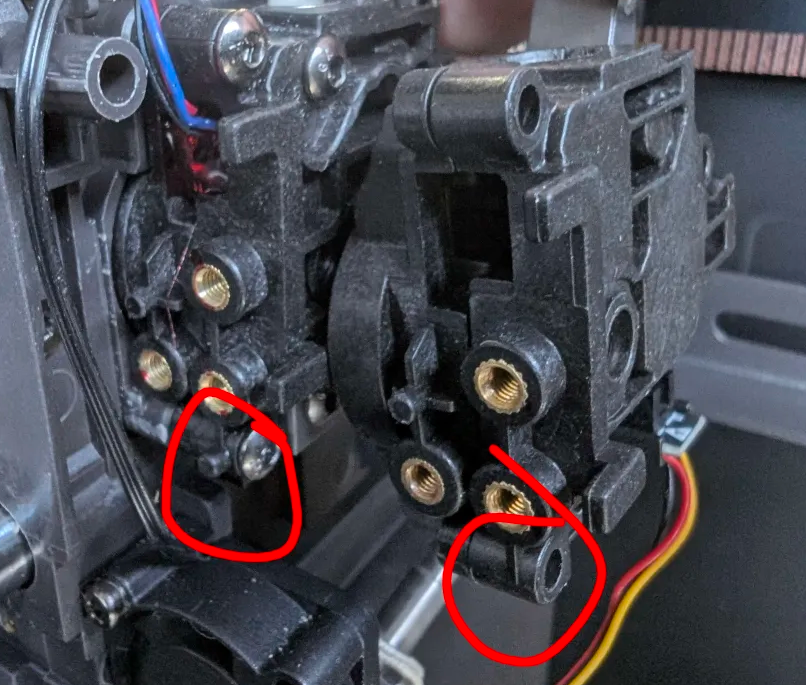
Note: If you have older version (right), you may need cut the small lug on the new extruder assembly (installed - left) to fit new updated design extruder. You can use provided flush cutter with printers to cut that away to point where the strain gauge can be reinstalled.
Step 1: Install the extruder module
1. Use an S2.0 Allen key to tighten the screws that secure the extruder module.

Step 2: Install the wiring harness
1. Insert the cable into the slot.

2.Insert the strain gauge harness head into the print head main board.

3.Insert the cutter detection harness head into the print head main board.

4.Insert the material break detection harness head into the print head main board.

5.Insert the cooling fan harness head of the duct into the print head main board.

6.Insert the model cooling fan harness head into the print head main board.

Step 3: Install the print head housing
1. Insert the Teflon tube into the extruder and tighten it with the blue buckle.

2.Use an S2.0 Allen key to tighten the fixing screws of the rear housing of the print head.

3.Align and plug in the model cooling fan harness head。
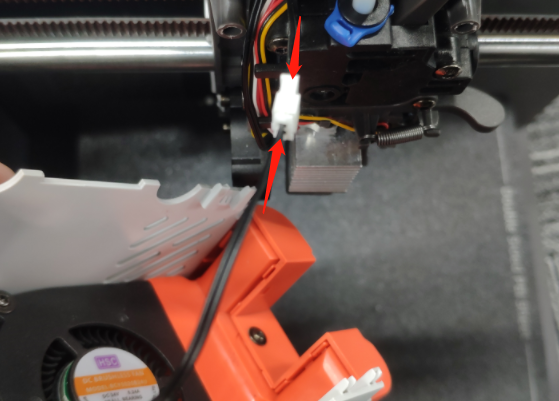
4.Tighten the print head housing inwards to ensure that the housing is not loose.

Was this article helpful?
That’s Great!
Thank you for your feedback
Sorry! We couldn't be helpful
Thank you for your feedback
Feedback sent
We appreciate your effort and will try to fix the article